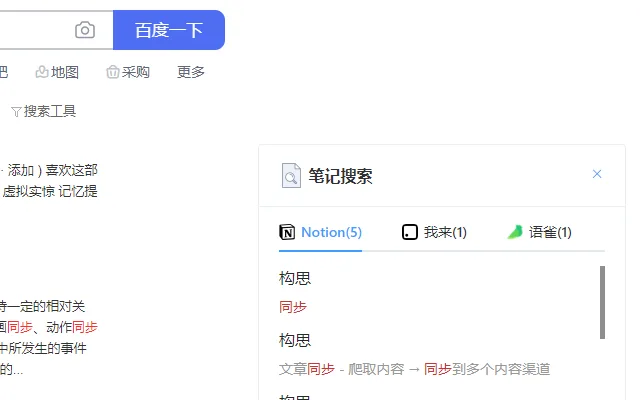

Unified Search for Note Platforms
Overview
The software is designed to address the growing challenge of fragmented note-taking across multiple platforms. Users who maintain content in Notion, Flomo, Diigo, Yuxiang, and I-Lai often face difficulties retrieving information efficiently. This tool enables cross-platform search, allowing users to query their entire note library from a single interface. Its primary purpose is to improve information accessibility and reduce time spent navigating between applications.
Target users include knowledge workers, researchers, students, and digital organizers who rely on multiple note-taking services. By consolidating search functionality, the software helps users maximize the utility of their existing content without requiring data migration or platform switching. The developer did not provide additional background details.
Real-world usage scenarios include retrieving a past project reference across Notion and Flomo, locating a bookmarked article in Diigo while working in a Yuxiang note, or cross-referencing ideas from different tools during research. The tool supports a growing ecosystem of platforms, with recent updates expanding compatibility and improving usability.
Key Features & Capabilities
- Multi-Platform Search – Enables unified search across Notion, Flomo, Diigo, Yuxiang, and I-Lai, eliminating the need to switch between apps.
- Real-Time Query Processing – Delivers fast results by indexing content from connected platforms, reducing time spent searching.
- Default Minimum Width Adjustment – Version v0.0.4 introduces a customizable default width, improving usability on various screen sizes.
- Seamless Integration – Works directly within the browser environment, requiring no complex setup or system-level changes.
- Privacy-Focused Design – Operates locally where possible, minimizing data exposure during searches.
For example, a researcher can search for "machine learning applications" and receive results from both their Notion project files and Flomo daily notes. A student might locate a Diigo bookmarked paper while drafting a Yuxiang summary. The tool streamlines workflows by centralizing access to scattered information, enhancing productivity and reducing cognitive load.
User Interface, Workflow & Performance
The user interface is designed for simplicity and efficiency, featuring a compact search bar and results panel. Navigation is intuitive, with minimal steps required to initiate a search. The workflow is streamlined: users input a query, and results appear dynamically, categorized by platform and relevance.
Performance observations are based on general software behavior patterns. The tool operates as a browser extension, leveraging client-side processing to maintain responsiveness. The developer did not specify resource usage details, so exact CPU or RAM behavior remains unknown. Stability is expected to be consistent with standard extension architecture, though real-world performance may vary based on user environments.
Workflow efficiency is enhanced by the tool’s ability to deliver immediate feedback. Users can refine queries in real time, and results are updated without page reloads. The interface remains unobtrusive, allowing users to focus on their primary tasks.
Compatibility & System Requirements
The software is compatible with Windows, Mac, and Linux operating systems. It functions as a browser extension, meaning it relies on the host browser’s capabilities rather than native OS features. The installation size is 2.3 MB, indicating a lightweight footprint.
Exact system requirements were not listed. Platform compatibility information is limited to the supported operating systems. Users should ensure their browser is up to date to maintain optimal functionality. The developer did not specify hardware requirements or minimum specifications.
Pros and Cons
Pros
- Centralizes search across multiple note platforms
- Lightweight at 2.3 MB
- Free to use with no hidden costs
- Regular updates with new platform support
- Designed with privacy in mind
Cons
- Platform support is limited to specific tools
- Exact performance metrics not provided
- No official documentation or user guides available
- Dependent on browser functionality
- Early-stage development (v0.0.4)
FAQ Section
Is the software available for all browsers?
The software is designed to work as a browser extension, but specific browser compatibility was not detailed in the provided information.
Is my data safe when using this tool?
The tool is built with privacy in mind, operating locally where possible. However, the developer did not provide specific details about data handling or encryption.
How often are updates released?
Updates are released regularly, as evidenced by the progression from v0.0.3 to v0.0.4, with new platform support and interface improvements.
Can I use this tool offline?
Offline functionality is not confirmed. The tool relies on browser-based access to platform data, which may require an internet connection.
What license type does the software use?
The software is free to use, but the specific license type was not disclosed in the provided details.
Final Thoughts + CTA
This tool offers a practical solution for users managing content across multiple note platforms. Its ability to unify search across Notion, Flomo, Diigo, Yuxiang, and I-Lai significantly enhances information retrieval efficiency. While still in early development, the consistent update cycle and focus on usability indicate strong potential.
Professionals, students, and researchers who juggle multiple tools will benefit most from this streamlined approach. The lightweight design and free access make it accessible to a wide audience. For those seeking a faster way to find information across platforms, this tool delivers tangible value.
Download Unified Search for Note Platforms now.







